
Search engines rely on bots to discover, crawl, and index billions of webpages across the internet. However, not every page on your website needs to be crawled. Administrative pages, duplicate content, internal search results, and temporary files often provide little value to search engines and can consume valuable crawl resources.
This is where the robots.txt file becomes an essential part of technical SEO.
A robots.txt file gives search engine crawlers instructions about which areas of your website they can access and which they should avoid. When implemented correctly, it helps improve crawl efficiency, protects unnecessary sections of your website from being crawled, and supports a well-organized SEO strategy.
Although robots.txt is relatively simple, it’s also one of the most misunderstood SEO files. Many website owners mistakenly believe it prevents pages from appearing in Google Search, while others accidentally block their entire website from being crawled because of a single incorrect directive.
In this guide, you’ll learn what robots.txt is, how it works, how Google interprets it, common robots.txt directives, practical examples, and the best practices for optimizing your robots.txt file for SEO.
What Is Robots.txt?
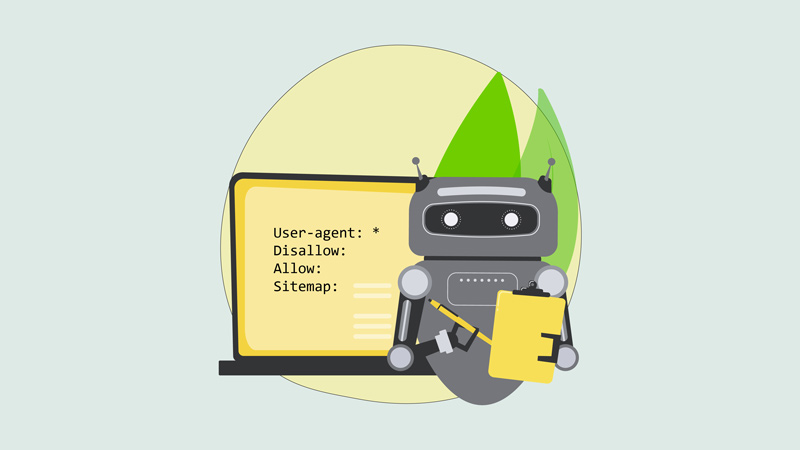
A robots.txt file is a plain text file located in the root directory of a website that provides crawling instructions to search engine bots and other web crawlers.
It follows the Robots Exclusion Protocol (REP), a standard that allows website owners to specify which parts of their site should or should not be crawled by automated bots.
A robots.txt file is usually located at:
https://www.example.com/robots.txtWhen a search engine visits your website, one of the first files it requests is the robots.txt file. It reads the instructions before crawling your pages and decides which URLs it is allowed to access.
The robots.txt definition is straightforward:
“A robots.txt file is a text file that tells search engine crawlers which pages, folders, or files they are allowed or not allowed to crawl on a website.”
It’s important to understand that robots.txt controls crawling, not necessarily indexing. We’ll discuss this distinction later in the guide.
Why Is Robots.txt Important for SEO?
While robots.txt isn’t a direct ranking factor, it plays an important role in maintaining a healthy website structure and improving crawl efficiency.
Here are some of its primary SEO benefits.
1. Improves Crawl Efficiency
Search engines allocate a limited crawl budget to every website.
If bots spend time crawling duplicate URLs, internal search pages, filtered product listings, or other low-value pages, they may spend less time discovering your important content.
A properly configured robots.txt file helps search engines focus on the pages that matter most.
2. Prevents Crawling of Unnecessary Content
Certain areas of a website are intended only for administrators or users and provide little SEO value.
Examples include:
- Login pages
- Shopping cart pages
- Temporary files
- Administrative directories
- Internal search result pages
Blocking these sections from crawling helps search engines prioritize more valuable content.
3. Reduces Server Load
Large websites can receive thousands of crawler requests every day.
Limiting access to unnecessary files can reduce server resources consumed by automated bots, improving overall website performance.
4. Supports Better Technical SEO
A well-maintained robots.txt file complements other technical SEO elements such as:
Together, these components help search engines crawl and understand your website more efficiently.
How Does Robots.txt Work?
When a search engine crawler visits your website, it follows a simple process.
- The crawler requests your robots.txt file
- It reads the directives that apply to its user agent
- It determines which pages or folders it may crawl
- It begins crawling the permitted URLs
For example, if your robots.txt file contains:
User-agent: *
Disallow: /admin/
The instruction tells all compliant search engine crawlers not to crawl any URLs inside the ‘/admin/’ directory.
Any pages outside that folder remain available for crawling.
Robots.txt Controls Crawling, Not Indexing
One of the biggest misconceptions about robots.txt is that it prevents pages from appearing in Google Search.
In reality, robots.txt primarily controls whether search engines are allowed to crawl a page, not whether that page can be indexed.
For example, if another website links to a page you’ve blocked in robots.txt, Google may still index the URL based on the information available from external sources, even though it cannot crawl the page itself.
If you want to prevent a page from appearing in search results, using the noindex directive (where supported) or other appropriate methods is generally more effective than relying solely on robots.txt.
Understanding the difference between crawling and indexing is essential for implementing robots.txt correctly.
Understanding Common Robots.txt Directives
A robots.txt file consists of simple directives that instruct crawlers how to interact with your website.
1. User-agent
The User-agent directive specifies which crawler the rule applies to.
For example:
User-agent: GooglebotThis rule applies only to Google’s primary web crawler.
Using an asterisk (*) targets all compliant crawlers.
Example:
User-agent: *2. Disallow
The Disallow directive tells crawlers which pages or directories they should not crawl.
Example:
User-agent: *
Disallow: /private/
This prevents compliant bots from crawling any URLs within the ‘/private/’ folder.
3. Allow
The Allow directive explicitly permits crawling of specific pages or directories, even when a broader Disallow rule exists.
For example:
User-agent: *
Disallow: /images/
Allow: /images/logo.png
In this case, crawlers are instructed not to crawl the ‘/images/’ folder except for the logo.png file.
4. Sitemap
The Sitemap directive tells search engines where to find your XML sitemap.
Example:
Sitemap: https://www.example.com/sitemap.xmlIncluding your sitemap helps search engines discover important pages more efficiently and is considered a best practice for most websites.
Robots.txt Example
Although robots.txt files can vary depending on the type of website, they all follow the same basic structure.
Let’s look at some common robots.txt examples and what each one does.
1. Allow All Crawlers
This is the simplest robots.txt configuration.
User-agent: *
Disallow:
This tells all compliant search engine bots that they are allowed to crawl every page on the website.
2. Block a Specific Folder
If you don’t want search engines crawling an administrative directory, use:
User-agent: *
Disallow: /admin/
This prevents compliant crawlers from accessing anything inside the ‘/admin/’ directory.
3. Block a Single Page
You can also block an individual page.
User-agent: *
Disallow: /private-page/
Only that specific page will be restricted from crawling.
4. Block PDF Files
If you want to prevent crawlers from accessing PDF documents, you can use:
User-agent: *
Disallow: /*.pdf$
This tells compliant bots not to crawl PDF files on your website.
5. Include Your XML Sitemap
Many websites include the sitemap location at the bottom of the robots.txt file.
Sitemap: https://www.example.com/sitemap.xmlThis makes it easier for search engines to discover your important pages.
Here is how Google interprets the robots.txt specification.
What Is a Default Robots.txt File?
A default robots.txt file is the initial configuration used by a website before any custom crawling rules are added.
For many small websites, a simple file like this is sufficient:
User-agent: *
Disallow:

Sitemap: https://www.example.com/sitemap.xml
This configuration:
- Allows search engines to crawl the entire website.
- Provides the location of the XML sitemap.
- Keeps the robots.txt file clean and easy to maintain.
As your website grows, you may add additional rules to manage specific directories or files.
Understanding the Disallow Directive
The Disallow directive is one of the most important commands in robots.txt.
It tells compliant search engine crawlers which pages or directories they should avoid crawling.
1. Block an Entire Directory
User-agent: *
Disallow: /temp/
Everything inside the ‘/temp/’ directory will be excluded from crawling.
2. Block a Specific File
User-agent: *
Disallow: /draft.html
Only that individual file is blocked.
3. Block Multiple Directories
User-agent: *
Disallow: /admin/
Disallow: /private/
Disallow: /checkout/
Each directory is listed on its own line.
Keeping rules organized makes future maintenance much easier.
Robots.txt Disallow All
One of the most dangerous robots.txt configurations is:
User-agent: *
Disallow: /
This directive tells all compliant crawlers not to crawl any page on the website.
While this can be useful during website development or staging, accidentally deploying it on a live website can prevent search engines from crawling your content.
Before launching a website, always verify that your robots.txt file doesn’t contain this rule unless you intentionally want to block crawling.
How to Generate a Robots.txt File
Creating a robots.txt file doesn’t require special software.
You can generate one by:
- Creating a plain text file named robots.txt.
- Adding the appropriate directives.
- Uploading it to your website’s root directory.
For example:
https://www.example.com/robots.txtMany content management systems and SEO plugins also generate robots.txt files automatically.
Regardless of how it’s created, always review the file carefully before publishing it.
Robots.txt in WordPress
If your website runs on WordPress, robots.txt is usually managed automatically.
By default, WordPress creates a virtual robots.txt file if a physical one doesn’t already exist.
A typical WordPress robots.txt file may look similar to:
User-agent: *
Disallow: /wp-admin/
Allow: /wp-admin/admin-ajax.php

Sitemap: https://www.example.com/sitemap.xml
This configuration allows search engines to crawl your website while preventing unnecessary crawling of the WordPress administration area.
Unless you have specific technical requirements, avoid making unnecessary changes to the default WordPress directives.
How to Change Robots.txt Using Yoast SEO
Many WordPress users manage robots.txt with SEO plugins.
If you’re using Yoast SEO, you can edit the robots.txt file through the plugin’s file editing tools (when supported by your hosting environment).
Before making changes:
- Create a backup of your existing robots.txt file
- Test your new rules carefully
- Avoid blocking important website sections
Small errors in robots.txt can affect how search engines crawl your website, so changes should always be made thoughtfully.
When Should You Use Robots.txt?
Robots.txt is useful whenever you want to guide search engine crawlers away from low-value or unnecessary areas of your website.
Common use cases include:
- Blocking administrative directories
- Preventing crawling of staging or testing environments
- Restricting internal search result pages
- Blocking temporary files or duplicate resources
- Reducing unnecessary crawler activity
- Specifying the location of your XML sitemap
However, robots.txt should not be used simply to hide sensitive information.
Since anyone can access your robots.txt file by visiting:
https://www.example.com/robots.txtIt should never be relied upon as a security measure.
Sensitive files should instead be protected using authentication, permissions, or server-level security controls.
Does Robots.txt Affect SEO?
Indirectly, yes.
Robots.txt isn’t a ranking factor, but it influences how efficiently search engines crawl your website.
A properly configured robots.txt file can:
- Improve crawl efficiency
- Help search engines discover important pages faster
- Reduce wasted crawl budget
- Support better technical SEO
On the other hand, an incorrectly configured robots.txt file can accidentally block valuable content from being crawled, negatively affecting your website’s visibility.
For this reason, every robots.txt file should be reviewed carefully whenever significant website changes are made.
Robots.txt SEO Best Practices
A robots.txt file may be small, but it can significantly impact how search engines crawl your website. Following proven best practices helps ensure that search engines focus on your most valuable content without accidentally blocking important pages.
1. Keep Your Robots.txt File Simple
Only include directives that serve a clear purpose.
Overly complex robots.txt files are harder to maintain and increase the risk of configuration errors.
2. Don’t Block Important Website Pages
Avoid blocking pages that you want Google to crawl and potentially rank, including:
- Blog posts
- Product pages
- Service pages
- Category pages
- Landing pages
Blocking these pages can prevent Google from fully understanding your website.
3. Allow Access to CSS and JavaScript Files
Google renders webpages much like a modern browser. Blocking CSS or JavaScript files may prevent Google from accurately evaluating your page layout, functionality, and user experience.
Unless absolutely necessary, allow search engines to access these resources.
4. Include Your XML Sitemap
Adding your XML sitemap to robots.txt helps search engines discover important pages more efficiently.
Example:
Sitemap: https://www.example.com/sitemap.xmlAlthough search engines can find your sitemap through other methods, including it in robots.txt is considered a best practice.
5. Review Robots.txt After Website Changes
Whenever you:
- Redesign your website
- Change your CMS
- Install SEO plugins
- Migrate domains
- Update your site structure
Review your robots.txt file to ensure important content remains crawlable.
Common Robots.txt Mistakes
Many SEO issues occur because of simple mistakes in robots.txt.
Here are some of the most common ones.
1. Blocking the Entire Website
The following directive blocks all compliant search engine crawlers:
User-agent: *
Disallow: /
While this may be appropriate on a staging website, leaving it on a live site can severely impact your search visibility.
Always verify your robots.txt file before launching a website.
2. Using Robots.txt Instead of Noindex
Many people assume that blocking a page in robots.txt prevents it from appearing in Google Search.
It doesn’t.
Robots.txt only controls crawling. If your goal is to prevent a page from being indexed, other methods, such as the appropriate noindex implementation, are generally more suitable.
3. Blocking Important Resources
Blocking CSS, JavaScript, fonts, or images can prevent Google from rendering pages correctly.
This may affect how Google evaluates your website and could lead to indexing or usability issues.
4. Incorrect Syntax
Robots.txt directives are simple, but even small formatting mistakes can cause rules to be ignored.
Examples include:
- Misspelled directives
- Incorrect folder paths
- Missing slashes
- Invalid wildcard usage
Always verify your syntax before publishing changes.
5. Forgetting to Update the Sitemap
If your sitemap URL changes after a migration or website redesign, remember to update the Sitemap directive in your robots.txt file.
An outdated sitemap may slow the discovery of new content.
How to Test Robots.txt
Testing your robots.txt file helps ensure that search engines can crawl the pages you intend while respecting your restrictions.
Here are a few ways to verify your configuration.
1. View the Robots.txt File
Open your browser and visit:
https://www.example.com/robots.txtReplace example.com with your own domain.
This lets you quickly verify that:
- The file exists
- The syntax appears correct
- The latest version is publicly accessible
2. Use Google Search Console
Google Search Console provides valuable tools for checking how Google interacts with your website.
The URL Inspection tool can help determine whether important pages are crawlable and identify issues affecting Google’s access to your content.
3. Crawl Your Website with an SEO Tool
Website crawlers such as Screaming Frog SEO Spider can identify:
- Blocked URLs
- Incorrect robots.txt rules
- Crawl restrictions
- Missing resources
Regular technical audits help detect problems before they affect your organic performance.
Robots.txt vs. Meta Robots
Although both influence search engines, they serve different purposes.
| Robots.txt | Meta Robots |
|---|---|
| Controls whether search engine bots may crawl a page. | Controls how an individual page should be indexed after it has been crawled. |
| Implemented as a text file. | Implemented within the HTML of a webpage. |
| Applies to directories or groups of pages. | Applies to individual pages. |
| Primarily manages crawling behavior. | Primarily manages indexing behavior. |
In many technical SEO situations, robots.txt and meta robots work together rather than replacing one another.
Robots.txt vs. XML Sitemap
These two files complement each other.
| Robots.txt | XML Sitemap |
|---|---|
| Tells search engines what they should avoid crawling. | Helps search engines discover important pages that should be crawled and indexed. |
| Restricts crawler access. | Promotes page discovery. |
Think of them as working together:
- Robots.txt says, “You don’t need to crawl these pages.”
- XML Sitemap says, “These are the pages you should prioritize.”
Learn more about XML sitemap.
Final Thought
A properly configured robots.txt file is a fundamental component of technical SEO. While it doesn’t directly influence rankings, it helps search engines crawl your website more efficiently by guiding them toward valuable content and away from unnecessary pages.
Understanding the difference between crawling and indexing is essential. Robots.txt tells search engines where they can crawl, but it doesn’t guarantee whether a page will or won’t appear in search results. Combining robots.txt with other technical SEO practices, such as XML sitemaps, canonical tags, internal linking, and meta robots directives, creates a stronger foundation for search engine visibility.
As your website grows, review your robots.txt file regularly to ensure it reflects your current site structure and SEO goals. Even small configuration errors can have a significant impact on crawlability, so routine audits are well worth the effort.
When used correctly, robots.txt becomes a valuable tool for improving crawl efficiency, supporting better indexing, and maintaining a healthy, search-friendly website.