
Before a webpage can appear in Google Search, it must first be discovered and crawled. Regardless of how valuable your content is, it cannot rank if Google doesn’t know it exists or cannot access it.
Google crawling is the process by which Google’s automated systems explore websites, discover new pages, and revisit existing ones to identify updates. It is the first stage of Google’s search process and serves as the foundation for indexing and ranking.
Understanding how Google crawling works helps website owners, SEO professionals, and digital marketers create websites that are easier for Google to discover and process. It also helps identify technical issues that may prevent important pages from appearing in search results.
In this guide, you’ll learn what Google crawling is, how Googlebot works, why crawling is important for SEO, and how Google’s crawlers discover and process websites.
What Is Google Crawling?
Google crawling is the process of discovering and accessing webpages using automated software known as Googlebot. During this process, Google’s crawlers visit webpages, read their content, follow links, and collect information that may later be evaluated for inclusion in Google’s search index.
Crawling is the first step in Google’s search pipeline.
A page generally follows this sequence:
- Google discovers the page
- Google crawls the page
- Google analyzes the content
- Google determines whether the page should be indexed
- Indexed pages may become eligible to rank in search results
It’s important to understand that crawling does not guarantee indexing, and indexing does not guarantee rankings. Each stage has its own evaluation process.
What Is Googlebot?
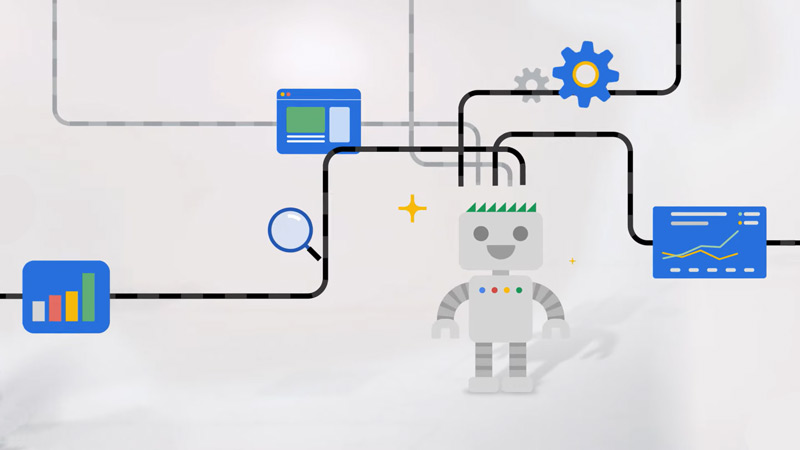
Googlebot is Google’s web crawler that continuously scans the internet looking for new and updated content.
Instead of manually reviewing billions of webpages, Google relies on Googlebot to automate the discovery process.
Googlebot performs tasks such as:
- Discovering new webpages
- Revisiting previously crawled pages
- Following internal and external links
- Reading page content and HTML
- Processing structured data
- Detecting updated content
- Identifying technical issues that affect crawling
The information collected by Googlebot is then processed by Google’s indexing systems, where pages are evaluated for inclusion in Google Search.
Google continuously improves Googlebot to better understand modern websites, including those that use JavaScript and dynamic content.
Why Google Crawling Is Important
Without crawling, Google cannot evaluate your content or determine whether it should appear in search results.
Even high-quality content has little chance of ranking if Google cannot successfully crawl the page.
Effective crawling helps Google:
- Discover new pages
- Find updated content
- Understand your website structure
- Identify relationships between pages
- Process internal links
- Detect technical issues
- Evaluate website quality
For website owners, proper crawling offers several important benefits.
1. Faster Content Discovery
When Google can easily crawl your website, newly published pages are discovered more quickly.
This is especially important for:
- Blog articles
- News content
- Product pages
- Service pages
- Seasonal campaigns
Although Google eventually discovers many pages naturally, a crawl-friendly website helps speed up the process.
2. Better Indexing Opportunities
Google must crawl a page before deciding whether to include it in its search index.
Improving crawlability increases the likelihood that valuable pages can be evaluated for indexing.
However, Google still considers many other quality signals before deciding whether a page should be indexed.
3. Improved Website Maintenance
Regular crawling also helps Google detect changes to your website.
Examples include:
- Updated content
- Deleted pages
- Redirects
- Canonical changes
- Broken links
- Server errors
Keeping your website technically healthy allows Google to process these changes more efficiently.
How Google Crawling Works
Google’s crawling process involves much more than simply visiting webpages.
Its systems constantly evaluate which pages should be crawled, when they should be revisited, and how website resources should be allocated.
Although Google’s exact algorithms are proprietary, the overall crawling process generally follows these stages.
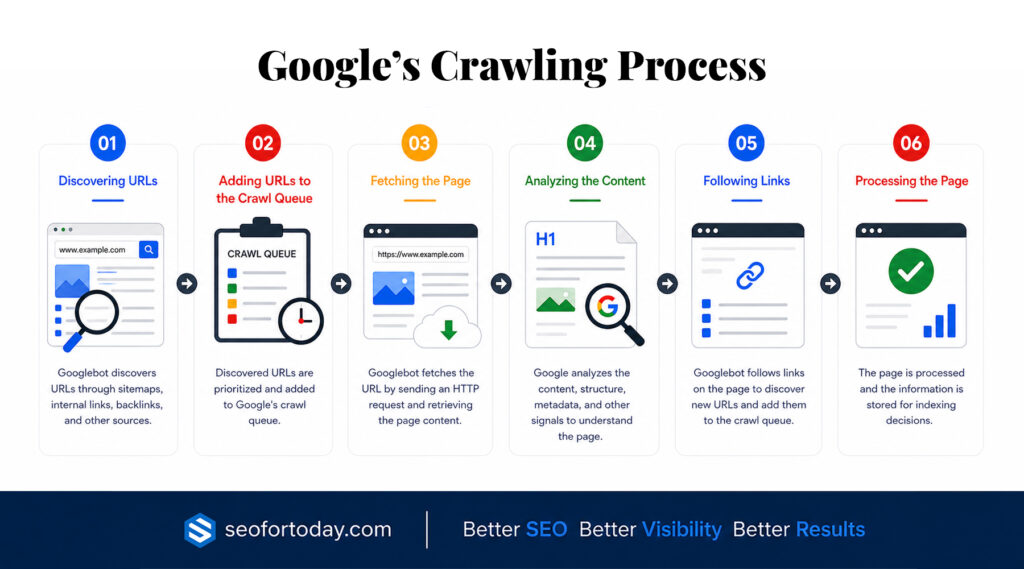
Step 1: Discovering URLs
Every crawl begins with discovering a webpage.
Google finds URLs from several sources, including:
- Internal links
- External backlinks
- XML sitemaps
- Previously crawled pages
- URL submissions through Google Search Console
Pages that are isolated and have no internal or external links are much harder for Google to discover.
Step 2: Adding URLs to the Crawl Queue
After discovering a page, Google decides whether it should be added to its crawl queue.
Not every discovered page is crawled immediately.
Google considers factors such as:
- Website quality
- Crawl demand
- Website health
- Available crawl resources
This helps Google prioritize billions of webpages across the internet.
Step 3: Fetching the Page
When Googlebot visits a URL, it requests the page from the web server.
During this stage, Google retrieves information such as:
- HTML content
- Metadata
- Images
- Structured data
- HTTP response codes
- Internal links
If the server cannot deliver the page successfully, crawling may fail.
Step 4: Analyzing the Content
After retrieving the page, Google analyzes its contents to better understand the webpage.
This evaluation includes:
- Page titles
- Headings
- Main content
- Images
- Internal links
- External links
- Structured data
- Canonical tags
Google also evaluates whether additional resources are required to fully understand the page.
Step 5: Following Links
Googlebot continues crawling by following links found on the page.
This is one reason why internal linking is so important.
A strong internal linking structure helps Google:
- Discover additional pages.
- Understand website hierarchy.
- Identify important content.
- Crawl websites more efficiently.
Pages that receive few or no internal links may be crawled less frequently.
Step 6: Processing the Page
After crawling is complete, Google processes the collected information.
At this stage, Google determines whether the page is suitable for indexing.
If the page meets Google’s quality and technical requirements, it may be added to Google’s search index.
Otherwise, it may remain excluded from search results until issues are resolved.
Google Crawling vs. Indexing vs. Ranking
Many people use these terms interchangeably, but they represent three separate stages of Google’s search process.
Understanding the differences is essential for diagnosing SEO issues.
| Process | What Happens |
|---|---|
| Crawling | Google discovers and visits webpages to collect information. |
| Indexing | Google analyzes the crawled page and decides whether to include it in its search index. |
| Ranking | Indexed pages compete to appear for relevant search queries based on hundreds of ranking factors. |
For example:
A newly published blog post may be discovered today.
Googlebot crawls the page tomorrow.
A few days later, Google indexes the page.
Weeks later, after evaluating relevance, quality, authority, and user signals, the page may begin ranking for its target keywords.
Because these processes occur independently, a page can be:
- Crawled but not indexed.
- Indexed but not ranking well.
- Crawled repeatedly without significant ranking changes.
Understanding which stage is causing a problem makes it much easier to identify the right SEO solution.
Learn more about Google Indexing.
How Googlebot Discovers Webpages
Before Google can crawl a page, it must first know the page exists. Googlebot continuously discovers new URLs from multiple sources and decides which pages should be added to its crawl queue.
The easier it is for Google to discover your pages, the more efficiently your website can be crawled and evaluated.
1. Internal Links
Internal links are one of the primary ways Googlebot discovers pages within your website.
Whenever Google crawls a page, it follows relevant internal links to find additional content. A well-structured internal linking strategy helps Google understand your site’s hierarchy while ensuring important pages remain accessible.
For example, a pillar page that links to related supporting articles makes it easier for Google to crawl the entire topic cluster.
Pages with few or no internal links, often called ‘orphan pages’, are much harder for Google to discover and may receive little or no crawl activity.
Learn more about Internal Linking for SEO.
2. External Links
Google also discovers webpages through backlinks from other websites.
When Googlebot crawls another website and encounters a link pointing to your content, it may add that page to its crawl queue.
Quality backlinks not only help build authority but also assist Google in discovering new content faster.
Learn more about Off-page SEO.
3. XML Sitemaps
An XML sitemap provides Google with a structured list of important URLs on your website.
Although submitting a sitemap does not guarantee immediate crawling or indexing, it helps Google identify pages that you consider valuable.
This is especially useful for:
- Newly launched websites
- Large websites
- E-commerce stores
- Websites with complex navigation
- Recently published content
Submitting an updated sitemap through Google Search Console is considered a best practice for most websites.
Learn more about XML sitemap.
4. URL Submissions
Google Search Console includes a ‘URL Inspection’ tool that allows you to request crawling for individual pages.
This feature is particularly useful after:
- Publishing new content
- Updating existing pages
- Fixing technical SEO issues
- Correcting indexing problems
Requesting indexing does not guarantee immediate crawling, but it can notify Google that important changes have been made.
Types of Google Crawlers
Google uses several specialized crawlers, each designed for different purposes.
Although most website owners simply refer to “Googlebot,” Google’s crawling infrastructure includes multiple systems.
Some of the most common include:
1. Googlebot Smartphone
Google primarily uses the smartphone crawler because Google Search now relies on ‘mobile-first indexing’.
This crawler evaluates your website as it appears on mobile devices.
If your mobile version lacks content, structured data, or important functionality, Google may not fully understand your pages.
2. Googlebot Desktop
The desktop crawler continues to be used for certain situations, although mobile crawling has become Google’s primary method.
Maintaining a responsive website ensures both versions provide a consistent user experience.
3. Specialized Google Crawlers
Google also operates crawlers for specific products and services, including:
- Google Images
- Google News
- Google Video
- Google Ads
- Google StoreBot
These specialized crawlers help Google process different types of content across its ecosystem.
Understanding the Crawl Queue
Google discovers billions of webpages every day.
Since it is impossible to crawl every page immediately, Google places discovered URLs into a crawl queue.
The crawl queue helps Google prioritize which pages should be crawled first.
Several factors influence this priority, including:
- Website quality
- Content freshness
- Popularity
- Crawl demand
- Website performance
- Available crawl resources
Important pages on trusted websites often receive higher crawl priority than low-value or rarely updated pages.
Crawl Scheduling
Google does not crawl every page at the same frequency.
Instead, Google’s systems determine how often each page should be revisited.
Pages that are updated frequently often receive more regular crawl activity.
Examples include:
- News websites
- Active blogs
- Product catalogs
- Frequently updated documentation
Pages that rarely change may be revisited much less often.
Google’s goal is to use its crawling resources efficiently while keeping search results as current as possible.
Rendering Webpages
Modern websites often rely heavily on JavaScript to generate content dynamically.
After crawling a page, Google may render it using a version of the Chromium browser.
Rendering allows Google to process elements that are generated after the initial HTML loads, including:
- Navigation menus
- Interactive content
- Product information
- Client-side rendering
- JavaScript-generated text
If important content depends entirely on JavaScript and cannot be rendered correctly, Google may have difficulty understanding the page.
For this reason, website owners should ensure that essential content remains accessible even when JavaScript processing is delayed.
Mobile-First Crawling
Google now primarily crawls and indexes websites using their mobile version.
This approach, known as ‘mobile-first indexing’, reflects the fact that most users access the web through mobile devices.
To support mobile-first crawling, your website should:
- Use responsive design
- Display the same primary content on desktop and mobile
- Include identical structured data
- Maintain consistent metadata
- Ensure navigation remains accessible on smaller screens.
A poor mobile experience can affect Google’s ability to crawl and evaluate your website effectively.
Factors That Influence Crawl Frequency
Not every website receives the same level of crawl activity.
Google automatically adjusts crawl frequency based on numerous signals.
1. Website Authority
Well-established websites with strong backlink profiles often receive more consistent crawl activity because Google expects valuable content from trusted sources.
2. Content Freshness
Websites that publish or update content regularly encourage Googlebot to revisit more often.
Keeping evergreen articles current and publishing new content consistently can improve crawl frequency over time.
3. Internal Linking
Strong internal linking makes it easier for Googlebot to discover important pages and understand their relationship within your website.
Pages buried deep within your site architecture or receiving very few internal links may be crawled less frequently.
4. Website Speed
Fast-loading websites allow Googlebot to crawl more efficiently.
If your server responds quickly, Google can often crawl more pages during each visit.
Slow websites may reduce crawling efficiency, particularly for larger sites.
5. Server Reliability
Frequent server errors or downtime can discourage Google from crawling aggressively.
Maintaining reliable hosting and minimizing server issues helps ensure consistent crawl activity.
6. Content Quality
Google prioritizes pages that provide unique, valuable, and useful information.
Large numbers of thin, duplicate, or low-quality pages may reduce overall crawl efficiency because Google’s systems focus resources where they provide the greatest value.
Understanding these factors helps explain why some websites are crawled multiple times each day while others may only be revisited occasionally.
How to Optimize Your Website for Google Crawling
Making your website crawlable is one of the most important aspects of technical SEO. A well-optimized site helps Googlebot discover, access, and process your pages more efficiently, increasing the likelihood that valuable content will be indexed and appear in search results.
Although Google automatically crawls websites, following technical SEO best practices makes the process smoother and more effective.
1. Understand Crawl Budget
Crawl budget refers to the number of pages Googlebot is willing and able to crawl on your website within a given period.
For most small and medium-sized websites, crawl budget is not a major concern. However, it becomes increasingly important for large websites with thousands or millions of URLs.
Google determines crawl budget based on factors such as:
- Website popularity
- Server performance
- Crawl demand
- Content freshness
- Website health
Poor website structure, duplicate content, and unnecessary URLs can waste crawl resources, preventing Google from focusing on your most valuable pages.
Improving crawl efficiency helps Google spend more time discovering and updating important content.
Learn more about Fixing Crawl Budget Issues.
2. Submit an XML Sitemap
An XML sitemap provides Google with a roadmap of the important pages on your website.
While Google can discover pages through internal links, a sitemap helps ensure that important URLs are not overlooked.
A well-maintained sitemap should:
- Include only indexable pages
- Exclude redirected URLs
- Exclude broken pages
- Be updated whenever important content changes
- Reflect your current website structure
After creating your sitemap, submit it through Google Search Console and monitor it regularly for errors.
Learn more about XML sitemap.
3. Build a Strong Internal Linking Structure
Internal links help Googlebot move from one page to another while understanding the relationship between your content.
A logical internal linking structure offers several benefits:
- Faster content discovery
- Better crawl efficiency
- Improved understanding of topic relationships
- Stronger topical authority
- Better user navigation
Every important page should be accessible through internal links rather than existing in isolation.
Using descriptive anchor text also helps Google understand what linked pages are about.
4. Configure Robots.txt Correctly
The ‘robots.txt’ file tells search engine crawlers which parts of your website they are allowed or not allowed to access.
Common uses include preventing crawlers from accessing:
- Admin areas
- Login pages
- Temporary files
- Duplicate resources
However, robots.txt should be used carefully.
Blocking important pages by mistake can prevent Googlebot from crawling content that should appear in search results.
Regularly reviewing your robots.txt file helps avoid accidental crawling restrictions.
Learn more about Robots.txt.
5. Use Canonical Tags
Duplicate or highly similar content can make it difficult for Google to determine which version of a page should appear in search results.
Canonical tags help solve this problem by identifying the preferred version of a page.
Common situations where canonical tags are useful include:
- URL parameters
- Product variations
- Printer-friendly pages
- Duplicate category pages
Proper canonicalization helps consolidate ranking signals and improves crawl efficiency.
6. Improve Website Speed
Website speed affects both users and search engines.
Fast-loading websites allow Googlebot to crawl more pages efficiently during each visit.
Ways to improve page speed include:
- Compressing images
- Using modern image formats
- Enabling browser caching
- Reducing unnecessary JavaScript
- Minifying CSS and JavaScript files
- Using a content delivery network (CDN)
- Choosing reliable web hosting
Improving performance also supports Core Web Vitals and overall user experience.
Learn more about Website Speed Optimization.
7. Fix Broken Links
Broken internal links create dead ends for both users and search engine crawlers.
When Googlebot encounters broken links, it may waste crawl resources attempting to access unavailable pages.
Regularly audit your website for:
- Broken internal links
- Broken external links
- Incorrect redirects
- Missing resources
Fixing these issues improves crawl efficiency and website quality.
8. Manage Redirects Properly
Redirects are useful when pages move or URLs change.
However, excessive redirect chains can slow crawling and reduce efficiency.
Best practices include:
- Use permanent (301) redirects for moved content.
- Avoid redirect loops.
- Minimize redirect chains.
- Update internal links to point directly to the final destination.
Simple redirect structures help Googlebot reach important pages more efficiently.
9. Use Clean, Crawl-Friendly URLs
URLs should be simple, descriptive, and easy for both users and search engines to understand.
For example:
Good URL
example.com/google-crawling-guide
Less effective URLs often contain unnecessary parameters, random numbers, or unclear structures.
Keeping URLs readable improves usability and makes website architecture easier to understand.
10. Pay Attention to HTTP Status Codes
Whenever Googlebot visits a page, the server responds with an HTTP status code.
These responses help Google understand whether a page is available.
Some common status codes include:
200 OK
The page is accessible and functioning normally.
301 Moved Permanently
The page has permanently moved to a new URL.
302 Found
The redirect is temporary.
404 Not Found
The requested page does not exist.
410 Gone
The page has been permanently removed.
500 Internal Server Error
The server encountered an unexpected problem.
Monitoring these responses helps identify issues that may interfere with crawling.
11. Avoid Duplicate Content
Large amounts of duplicate content can make crawling less efficient.
Google may spend time processing multiple versions of nearly identical pages instead of focusing on unique, valuable content.
Reduce duplication by:
- Using canonical tags
- Consolidating similar pages
- Avoiding unnecessary URL parameters
- Creating original content
- Managing faceted navigation carefully
Providing clear signals helps Google determine which pages deserve priority.
12. Optimize JavaScript
Modern websites often rely heavily on JavaScript.
Although Google has become much better at rendering JavaScript, overly complex implementations can still delay crawling and indexing.
Whenever possible:
- Ensure important content is available in the initial HTML
- Avoid hiding essential content behind JavaScript interactions
- Test pages using URL Inspection in Google Search Console
- Verify that Google can render important page elements correctly
Making content easily accessible improves both crawling and indexing.
13. Maintain a Logical Website Structure
A clear website structure benefits both users and search engines.
Ideally, important pages should be reachable within a few clicks from your homepage.
A logical hierarchy helps Google:
- Understand page relationships.
- Identify priority pages.
- Discover new content.
- Crawl websites more efficiently.
Using categories, subcategories, and topic clusters creates a stronger overall architecture.
14. Keep Content Fresh
Google often revisits websites that consistently publish or update useful content.
Refreshing existing articles can encourage Googlebot to crawl them again.
Consider updating:
- Statistics
- Screenshots
- Examples
- Internal links
- Outdated information
- Broken references
Regular maintenance signals that your content remains valuable and relevant.
By combining these technical SEO practices, you create a website that is easier for Googlebot to discover, crawl, and process.
While no single optimization guarantees faster crawling, improving your site’s overall accessibility and structure gives Google the best opportunity to keep your content up to date in its search index.
How to Monitor Google Crawling
Optimizing your website for Google crawling is only part of the process. It’s equally important to monitor how Googlebot interacts with your website so you can identify issues before they affect your search visibility.
Several tools can help you understand Google’s crawling activity and diagnose technical SEO problems.
1. Google Search Console
Google Search Console is the most valuable free tool for monitoring how Google crawls your website.
It provides direct insights from Google about crawling, indexing, and search performance.
Some of the most useful reports include:
I. Crawl Stats Report
The Crawl Stats report shows how Googlebot interacts with your website over time.
You can monitor:
- Total crawl requests
- Crawl response times
- File types being crawled
- HTTP response codes
- Googlebot activity trends
- Host status
If crawl activity suddenly decreases or server errors increase, the report can help identify potential technical issues.
II. URL Inspection Tool
The URL Inspection tool allows you to examine how Google sees an individual webpage.
It can show whether a page has been:
- Crawled
- Indexed
- Rendered successfully
- Blocked from crawling
- Affected by technical issues
You can also request re-crawling after publishing new content or fixing technical problems.
III. Page Indexing Report
Although crawling and indexing are different processes, reviewing the Page Indexing report helps identify pages that Google has crawled but chosen not to index.
Common reasons include:
- Duplicate pages
- Soft 404 errors
- Redirected URLs
- Alternate pages with canonical tags
- Crawled but currently not indexed
- Discovered but currently not indexed
Monitoring these reports helps ensure valuable content remains eligible to appear in Google Search.
Learn more about Google Search Console.
2. Analyze Server Log Files
Server log files record every request made to your website, including visits from Googlebot.
Log file analysis provides one of the most accurate ways to understand how Google’s crawlers behave on your site.
By reviewing your logs, you can discover:
- Which pages Googlebot visits most frequently
- Which pages receive little or no crawl activity
- Crawl frequency over time
- Server response codes
- Crawl inefficiencies
For large websites, log analysis can uncover hidden technical SEO issues that standard SEO tools may miss.
Common Google Crawling Problems
Even well-designed websites can experience crawling issues.
Recognizing these problems early helps maintain healthy search visibility.
1. Blocked by Robots.txt
A misconfigured robots.txt file can unintentionally prevent Googlebot from accessing important pages.
Always review robots.txt carefully before blocking directories or URLs.
2. Orphan Pages
Pages without internal links are difficult for Google to discover.
Although they may appear in XML sitemaps, orphan pages often receive less crawl attention because they are disconnected from the rest of your website.
3. Broken Links
Broken internal links interrupt Google’s crawling path and reduce crawl efficiency.
Regular technical audits help identify and fix these issues.
4. Redirect Chains
Multiple redirects force Googlebot to make additional requests before reaching the final destination.
Long redirect chains waste crawl resources and should be simplified whenever possible.
5. Server Errors
Frequent server issues, such as ‘500 Internal Server Errors’, may prevent Googlebot from accessing your website.
Reliable hosting and proper server maintenance help ensure consistent crawling.
6. Slow Website Performance
Slow response times reduce crawling efficiency, especially on larger websites.
Improving server performance and page speed benefits both search engines and users.
7. Duplicate Content
Numerous duplicate or near-duplicate pages require Google to spend additional crawl resources processing similar content.
Proper canonicalization and content consolidation help reduce unnecessary crawling.
Best Practices for Google Crawling
Maintaining a crawl-friendly website is an ongoing process rather than a one-time task.
Follow these best practices to help Googlebot crawl your website efficiently:
- Maintain a logical website structure
- Use descriptive internal links
- Submit an updated XML sitemap
- Keep your robots.txt file accurate
- Monitor crawl reports in Google Search Console
- Improve page speed and server reliability
- Fix broken links promptly
- Use canonical tags correctly
- Keep important pages within a few clicks of your homepage
- Regularly update valuable content
- Remove or redirect obsolete pages when appropriate
- Ensure your website is mobile-friendly
Consistently following these practices improves both crawl efficiency and overall technical SEO.
Common Mistakes to Avoid
Many crawling problems result from avoidable technical mistakes.
Some of the most common include:
- Blocking important pages in robots.txt
- Forgetting to include new pages in your internal linking structure
- Ignoring crawl errors reported in Google Search Console
- Allowing redirect chains to grow over time
- Publishing large amounts of duplicate content
- Using complex URL structures unnecessarily
- Neglecting XML sitemap maintenance
- Failing to monitor server performance
- Assuming that every crawled page will automatically be indexed
- Confusing crawling issues with ranking issues
Understanding where problems occur in Google’s search process makes troubleshooting much easier.
Final Thoughts
Google crawling is the foundation of how your website becomes visible in Google Search. Before a page can be indexed or ranked, Google must first discover and crawl it successfully.
By understanding how Googlebot works, how pages are discovered, and what influences crawl efficiency, you can build a website that is easier for search engines to access and evaluate.
Technical improvements such as maintaining a logical site structure, strengthening internal linking, submitting XML sitemaps, optimizing page speed, and resolving crawl errors all contribute to a healthier, more crawlable website.
It’s also important to remember that crawling is only the first stage of Google’s search process. After a page is crawled, Google still evaluates whether it should be indexed and how it should rank for relevant search queries. Monitoring each stage through tools like Google Search Console helps you identify opportunities to improve your site’s overall search performance.
As your website grows, regularly reviewing crawl activity and following technical SEO best practices will help ensure that your most valuable content remains discoverable, accessible, and ready to compete in Google Search.