
A fast website is no longer just a nice feature. It has become an essential part of delivering a positive user experience and maintaining strong search visibility. Whether visitors are reading a blog, shopping online, or filling out a contact form, they expect webpages to load quickly, respond instantly, and remain stable while browsing.
To help website owners measure these experiences, Google introduced Core Web Vitals, a set of performance metrics that evaluate how real users interact with a webpage. These metrics focus on three key aspects of user experience: loading speed, responsiveness, and visual stability.
Since becoming part of Google’s Page Experience signals, Core Web Vitals have become an important consideration for SEO professionals, developers, and business owners. While they are not the most important ranking factor, they can influence search performance when combined with high-quality content, strong technical SEO, and a positive user experience.
In this guide, you’ll learn what Core Web Vitals are, how each metric works, why Google Core Web Vitals matter for SEO, and the practical steps you can take to improve your website’s performance.
What Are Core Web Vitals?
Core Web Vitals are a set of standardized performance metrics developed by Google to measure the real-world experience users have while visiting a webpage. Rather than focusing solely on technical page speed scores, these metrics evaluate how quickly users can see content, interact with the page, and browse without unexpected visual changes.
Unlike many traditional website performance tests, Core Web Vitals are based largely on real user data collected through the Chrome User Experience Report (CrUX). This means Google evaluates how actual visitors experience your website instead of relying only on simulated testing environments.
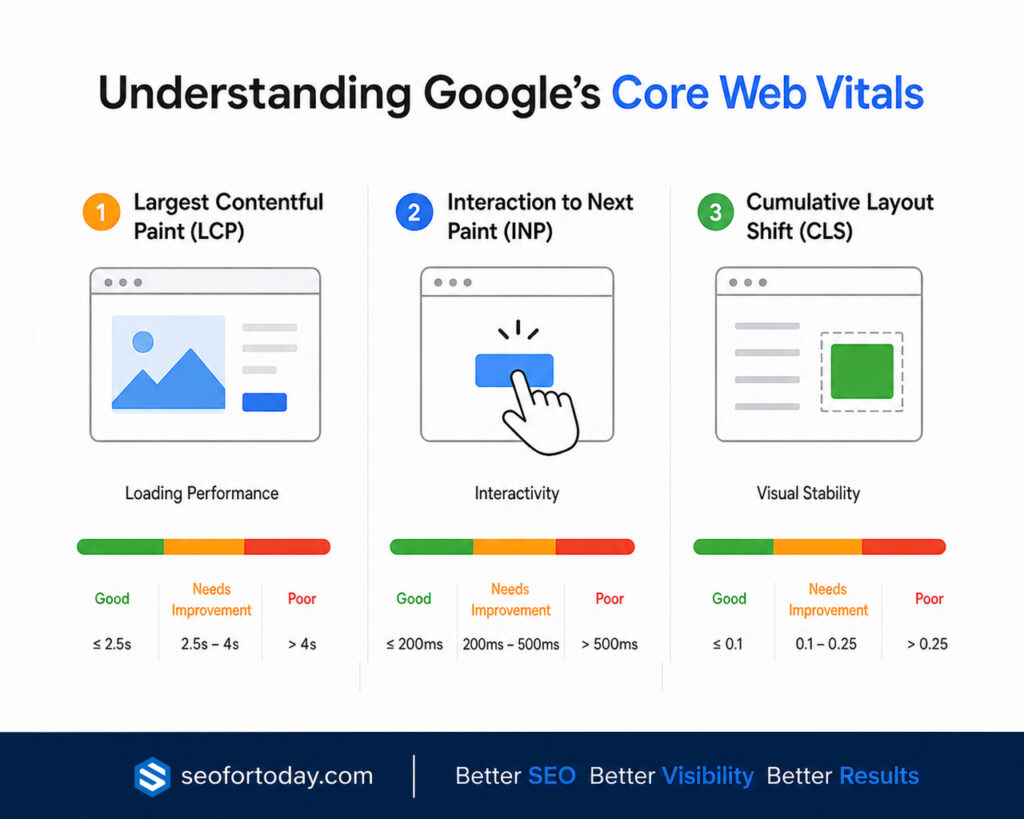
Today, Google measures three Core Web Vitals:
- Largest Contentful Paint (LCP) measures loading performance.
- Interaction to Next Paint (INP) measures responsiveness.
- Cumulative Layout Shift (CLS) measures visual stability.
Together, these metrics provide a clear picture of whether visitors enjoy a smooth browsing experience or encounter delays and frustration.
In simple terms, Core Web Vitals are Google’s way of measuring whether a webpage feels fast, responsive, and stable for real users.
Why Did Google Introduce Core Web Vitals?
For years, website owners focused almost entirely on traditional speed metrics such as page load time or PageSpeed scores. While these measurements were useful, they didn’t always reflect how visitors actually experienced a website.
For example, a page might technically finish loading quickly but still suffer from issues like:
- Large images appearing several seconds later.
- Buttons taking too long to respond after being clicked.
- Text or images suddenly shifting while users are reading.
- Menus freezing because of heavy JavaScript execution.
From a visitor’s perspective, these issues create frustration even if the website receives a relatively high performance score.
Google introduced Core Web Vitals to encourage websites to focus on real user experience instead of simply optimizing for synthetic speed tests. The goal is to reward websites that provide smooth, reliable, and enjoyable browsing experiences across desktop and mobile devices.
Instead of asking, “How fast did the page load?” Google now also asks:
- Could users quickly see the main content?
- Could they interact with the page without delays?
- Did the layout remain stable while the page loaded?
These questions better reflect how people actually experience the web.
Why Core Web Vitals Matter for SEO
Many website owners wonder whether Core Web Vitals directly improve rankings. The answer is yes, but with an important qualification.
Core Web Vitals are one of many ranking signals used by Google. They are not a shortcut to higher rankings, nor can they compensate for weak content or poor relevance. However, when multiple pages provide similarly valuable information, a better user experience can give one page a competitive advantage.
For example, imagine two websites publish equally comprehensive guides about technical SEO. If one website loads faster, responds instantly to user interactions, and remains visually stable while the other feels slow and frustrating, Google is more likely to favor the page that delivers the better overall experience.
This is why Core Web Vitals are often described as a tie-breaker rather than a primary ranking factor.
Improving Core Web Vitals can also provide benefits that extend well beyond SEO.
1. Better User Experience
Visitors are more likely to stay on a website that loads quickly and feels responsive. Faster websites create a smoother browsing experience, reducing frustration and encouraging users to explore additional pages.
2. Lower Bounce Rates
Slow-loading or unstable pages often cause visitors to leave before engaging with the content. By improving loading performance and responsiveness, websites can reduce bounce rates and retain more visitors.
3. Higher Engagement
A responsive website encourages users to interact with menus, forms, videos, product pages, and calls to action. When interactions happen immediately, visitors are more likely to continue browsing.
4. Improved Conversion Rates
Website performance directly influences conversions. Whether the goal is generating leads, selling products, or increasing newsletter signups, a fast and stable website removes unnecessary friction from the customer journey.
5. Stronger Mobile Experience
Most websites now receive the majority of their traffic from mobile devices. Core Web Vitals help ensure that visitors on smartphones enjoy the same high-quality experience as desktop users, even when using slower network connections.
Core Web Vitals and Google’s Page Experience Signals
Core Web Vitals are part of Google’s broader Page Experience framework, which evaluates how users experience a webpage beyond its content.
Although creating helpful, original, and trustworthy content remains Google’s highest priority, Page Experience signals help assess whether that content is delivered in a way that is easy and enjoyable to consume.
Core Web Vitals work alongside other technical factors, such as:
- Mobile friendliness
- HTTPS security
- Safe browsing
- Limited intrusive interstitials (such as disruptive pop-ups)
Together, these signals encourage websites to prioritize both excellent content and an excellent browsing experience.
It’s important to remember that Page Experience is not designed to replace content quality. Instead, it complements it. Even a technically perfect website is unlikely to rank well if it fails to satisfy search intent, while a highly relevant page with poor user experience may struggle against competitors that offer both quality content and better performance.
The Three Google Core Web Vitals Metrics
Google currently uses three Core Web Vitals to measure the overall user experience of a webpage. Each metric focuses on a different aspect of performance, helping website owners identify issues that may negatively affect visitors.
Together, these metrics answer three important questions:
- How quickly does the main content load?
- How responsive is the page when users interact with it?
- Does the page remain visually stable while loading?
Understanding each metric is the first step toward improving your website’s performance and providing a better browsing experience.
1. Largest Contentful Paint (LCP)
Largest Contentful Paint (LCP) measures how long it takes for the largest visible content element to appear within the user’s viewport after the page begins loading.
In most cases, the largest element is one of the following:
- Hero image
- Featured image
- Large heading
- Banner image
- Video thumbnail
- Large block of text
Since visitors typically focus on the main content first, Google considers LCP an important indicator of perceived loading speed.
LCP Score Thresholds
| Rating | LCP Score |
|---|---|
| Good | 2.5 seconds or less |
| Needs Improvement | More than 2.5 seconds and up to 4 seconds |
| Poor | More than 4 seconds |
A good LCP score helps reassure visitors that the page is loading quickly and encourages them to continue browsing.
What Causes Poor LCP?
Several factors can delay the loading of the largest visible element, including:
- Slow web hosting
- High server response time
- Large, uncompressed images
- Render-blocking CSS and JavaScript
- Too many third-party scripts
- Large background videos
- No browser caching
- Slow database queries
Even a beautifully designed webpage can feel slow if its largest content takes several seconds to appear.
How to Improve Largest Contentful Paint
Improving LCP usually involves reducing the time needed to load your primary content.
Some effective optimization techniques include:
- Upgrade to faster web hosting
- Use a Content Delivery Network (CDN)
- Compress images before uploading them
- Use modern image formats such as WebP or AVIF
- Remove unnecessary render-blocking resources
- Enable browser caching
- Minify CSS and JavaScript files
- Preload important fonts and hero images
- Reduce unnecessary third-party scripts
For most websites, optimizing images and improving server response time produce the biggest improvements.
Learn in depth about Largest Contentful Paint (LCP).
2. Interaction to Next Paint (INP)
Interaction to Next Paint (INP) measures how quickly a webpage responds after a visitor interacts with it.
Unlike older metrics that only measured the first interaction, INP evaluates responsiveness throughout the entire user session. This provides a more realistic picture of how users experience a website.
Examples of user interactions include:
- Clicking a button
- Opening a navigation menu
- Submitting a contact form
- Selecting a product filter
- Typing into a search box
- Expanding an accordion
- Adding an item to a shopping cart
When a website responds immediately, users perceive it as smooth and responsive. If interactions feel delayed, users may think the website is broken or unresponsive.
INP Score Thresholds
| Rating | INP Score |
|---|---|
| Good | 200 milliseconds or less |
| Needs Improvement | More than 200 ms and up to 500 ms |
| Poor | More than 500 ms |
Lower INP scores indicate a faster and more responsive website.
What Causes Poor INP?
The most common causes include:
- Heavy JavaScript execution
- Long-running browser tasks
- Too many plugins
- Large JavaScript frameworks
- Excessive third-party scripts
- Poor event handling
- Complex page interactions
When the browser is busy processing scripts, it cannot respond quickly to user input.
How to Improve Interaction to Next Paint
To improve INP, focus on reducing the browser’s workload.
Best practices include:
- Remove unused JavaScript.
- Delay non-essential scripts until after page load.
- Break large JavaScript tasks into smaller ones.
- Reduce third-party tracking scripts.
- Optimize event listeners.
- Minimize unnecessary animations.
- Use efficient coding practices.
Reducing JavaScript execution time often produces the most noticeable improvement.
Learn in depth about Interection to Next Paint.
3. Cumulative Layout Shift (CLS)
Cumulative Layout Shift (CLS) measures the visual stability of a webpage while it loads.
Have you ever tried clicking a button only to have it suddenly move because an image or advertisement loaded above it? That is exactly the type of issue CLS measures.
Unexpected layout shifts create a frustrating browsing experience because users lose their place on the page.
CLS Score Thresholds
| Rating | CLS Score |
|---|---|
| Good | 0.1 or less |
| Needs Improvement | More than 0.1 and up to 0.25 |
| Poor | More than 0.25 |
A lower CLS score means page elements remain stable as content loads.
Common Causes of Layout Shifts
Unexpected movement often occurs because developers forget to reserve space for dynamic content.
Typical causes include:
- Images without width and height attributes
- Advertisements loading late
- Embedded videos without reserved space
- Dynamically inserted banners
- Pop-ups pushing content downward
- Web fonts causing text reflow
- Lazy-loaded images without placeholders
These problems may seem minor individually, but together they create a poor user experience.
How to Improve Cumulative Layout Shift
To reduce layout shifts:
- Always specify image dimensions.
- Reserve space for advertisements and embedded content.
- Avoid inserting new content above existing elements.
- Use placeholders for lazy-loaded images.
- Optimize web font loading.
- Preload important fonts where appropriate.
- Test layouts across multiple screen sizes.
Maintaining a stable page layout makes your website feel more polished and trustworthy.
Learn in depth about Cumulative Layout Shift (CLS).
FID vs. INP: What’s Changed?
Before March 2024, Google used First Input Delay (FID) as one of its Core Web Vitals. FID measured the time between a user’s first interaction and the browser’s initial response.
Although useful, FID only evaluated the first interaction on a page. It didn’t account for delays that occurred later while users continued browsing.
To better represent real-world user experience, Google replaced FID with Interaction to Next Paint (INP) in March 2024.
The new metric measures responsiveness across the entire visit instead of focusing on a single interaction.
| Feature | First Input Delay (FID) | Interaction to Next Paint (INP) |
|---|---|---|
| Status | Retired in March 2024 | Current Core Web Vital |
| Measures | First interaction only | All interactions throughout the session |
| Accuracy | Limited | More representative of real user experience |
| Primary Focus | Initial responsiveness | Overall responsiveness |
If you still encounter references to FID in older SEO articles or optimization tools, remember that Google now uses INP as the official responsiveness metric.
Core Web Vitals Score Reference
The following table summarizes Google’s recommended thresholds for all three Core Web Vitals.
| Metric | Good | Needs Improvement | Poor |
|---|---|---|---|
| Largest Contentful Paint (LCP) | 2.5 seconds or less | More than 2.5 seconds and up to 4 seconds | More than 4 seconds |
| Interaction to Next Paint (INP) | 200 ms or less | More than 200 ms and up to 500 ms | More than 500 ms |
| Cumulative Layout Shift (CLS) | 0.1 or less | More than 0.1 and up to 0.25 | More than 0.25 |
These thresholds serve as benchmarks rather than strict pass-or-fail scores. Improving even one metric can significantly enhance the overall user experience and contribute to stronger website performance.
What Causes Poor Core Web Vitals?
Poor Core Web Vitals scores are usually the result of multiple performance issues rather than a single problem. While every website is different, the following factors are among the most common causes of slow loading, delayed interactions, and unstable page layouts.
1. Slow Server Response Time
Your web server plays a significant role in how quickly a page begins loading. Slow hosting, inefficient database queries, or an overloaded server can delay the delivery of HTML and other resources, negatively affecting Largest Contentful Paint (LCP).
2. Unoptimized Images
Large images are one of the biggest contributors to poor website performance. Uploading high-resolution images without compression forces browsers to download more data than necessary, increasing loading time.
Using modern image formats like WebP or AVIF and properly sizing images can significantly improve loading performance.
Learn more about Image Optimization.
3. Excessive JavaScript
JavaScript powers many interactive features, but too much of it can overwhelm the browser. Large JavaScript files, unused code, and long-running scripts can delay user interactions and negatively impact Interaction to Next Paint (INP).
4. Render-Blocking Resources
CSS and JavaScript files that must load before the page can render may prevent visitors from seeing content quickly. Eliminating or delaying non-critical resources helps improve loading speed.
5. Third-Party Scripts
Analytics tools, advertising networks, chat widgets, social media embeds, and tracking scripts often increase page load time. While many of these services are valuable, using too many can significantly reduce performance.
6. Layout Instability
Unexpected movement of images, advertisements, videos, or embedded content creates layout shifts that negatively affect Cumulative Layout Shift (CLS). Reserving space for dynamic content helps prevent these issues.
How to Improve Core Web Vitals
Improving Core Web Vitals requires a combination of technical optimization, efficient coding, and ongoing performance monitoring. The following best practices can help improve all three metrics.
1. Optimize Images
Images are often the largest resource on a webpage. Compress images before uploading them, use responsive image sizes, and adopt modern formats such as WebP or AVIF whenever possible.
Always specify image width and height attributes so browsers can reserve the correct amount of space before images finish loading.
2. Improve Server Performance
Choose reliable hosting with fast response times. If your website serves visitors from multiple geographic locations, consider using a Content Delivery Network (CDN) to reduce latency and improve loading speed.
3. Reduce JavaScript Execution
Review your JavaScript files regularly and remove code that is no longer needed. Split large scripts into smaller tasks, defer non-essential JavaScript, and reduce reliance on third-party libraries whenever possible.
4. Eliminate Render-Blocking Resources
Load only the CSS and JavaScript required for above-the-fold content during the initial page load. Deferring non-critical resources allows visitors to see content sooner.
5. Enable Browser Caching
Browser caching stores static resources on visitors’ devices, reducing the need to download the same files during future visits. This improves repeat page loads and reduces server requests.
6. Minify CSS and JavaScript
Removing unnecessary whitespace, comments, and unused code decreases file sizes and allows browsers to process resources more efficiently.
7. Use Lazy Loading
Lazy loading delays the loading of images, videos, and iframes until they are about to enter the user’s viewport. This reduces the amount of data loaded during the initial page request and can improve loading performance.
8. Optimize Web Fonts
Custom fonts can delay rendering and sometimes cause layout shifts. Preloading critical fonts and limiting the number of font families and weights can improve both LCP and CLS.
9. Limit Third-Party Resources
Evaluate every external script running on your website. Remove plugins, widgets, or tracking tools that provide little value but consume significant resources.
Learn more about Cloudflare, Caching, and SEO.
Field Data vs. Lab Data
When measuring Core Web Vitals, you’ll encounter two types of performance data: ‘Field Data’ and ‘Lab Data’. Understanding the difference is essential because they serve different purposes.
A. Field Data
Field data, also known as Real User Monitoring (RUM), comes from actual Chrome users visiting your website. It reflects real-world performance across different devices, browsers, network conditions, and geographic locations.
Google primarily uses field data from the Chrome User Experience Report (CrUX) when evaluating Core Web Vitals for Search.
Field data helps answer questions like:
- How does my website perform for real visitors?
- Are mobile users experiencing delays?
- Which pages consistently perform poorly?
B. Lab Data
Lab data is collected in a controlled testing environment using simulated conditions. It allows developers to identify performance issues before changes are deployed.
Although lab data is valuable for debugging, it does not directly influence Google’s ranking systems.
The best approach is to use both types of data together. Lab data helps identify problems, while field data confirms whether real users benefit from your optimizations.
Best Tools to Measure Core Web Vitals
Several free and paid tools can help you monitor your website’s performance.
1. Google PageSpeed Insights
PageSpeed Insights combines field data and lab data into a single report. It highlights Core Web Vitals scores while providing recommendations for improvement.
2. Google Search Console
The Core Web Vitals report in Google Search Console groups similar URLs with performance issues, making it easier to prioritize optimization efforts across your website.
3. Lighthouse
Lighthouse performs detailed performance audits in a controlled environment. It identifies opportunities to improve loading speed, accessibility, SEO, and overall page quality.
4. Chrome DevTools
Built directly into Google Chrome, DevTools helps developers analyze rendering performance, JavaScript execution, network requests, and layout shifts in real time.
5. GTmetrix
GTmetrix provides detailed waterfall charts, loading timelines, and performance recommendations that help identify bottlenecks.
6. WebPageTest
WebPageTest offers advanced testing options from different geographic locations, browsers, and connection speeds, making it especially useful for enterprise websites.
Common Core Web Vitals Mistakes
Many website owners unintentionally focus on the wrong goals while trying to improve performance.
Some of the most common mistakes include:
- Chasing a perfect 100 PageSpeed score instead of improving real user experience.
- Testing only the homepage while ignoring important landing pages.
- Optimizing desktop performance but neglecting mobile users.
- Installing multiple optimization plugins that conflict with one another.
- Uploading oversized images without compression.
- Loading unnecessary third-party scripts on every page.
- Ignoring field data and relying only on lab test results.
- Making performance improvements only once instead of monitoring continuously.
Remember that consistent improvement is more valuable than achieving a perfect score.
Core Web Vitals Best Practices
Whether you manage a personal blog, an eCommerce store, or a large business website, following these best practices can help maintain healthy Core Web Vitals over time.
- Monitor Core Web Vitals regularly instead of waiting for problems to appear.
- Compress every image before uploading it.
- Use responsive image sizes for different devices.
- Adopt modern image formats like WebP or AVIF.
- Reserve space for images, advertisements, and embedded content.
- Minimize JavaScript wherever possible.
- Reduce reliance on unnecessary third-party scripts.
- Enable browser caching and server-side compression.
- Test both desktop and mobile performance after major website updates.
- Continuously review performance reports in Google Search Console and PageSpeed Insights.
Performance optimization is an ongoing process rather than a one-time project.
Conclusion
Core Web Vitals have transformed the way website performance is measured by focusing on the experiences of real users rather than relying solely on traditional speed metrics. A website that loads quickly, responds immediately to user interactions, and maintains a stable layout creates a more enjoyable browsing experience while supporting your broader SEO strategy.
Although Google Core Web Vitals are only one part of Google’s ranking systems, improving these metrics often leads to benefits beyond search visibility. Faster pages can reduce bounce rates, increase user engagement, improve conversion rates, and build greater trust with visitors.
The most effective approach is to view Core Web Vitals as an ongoing optimization process rather than a one-time checklist. Regularly monitor your performance, test important pages, and continue refining your website as new technologies and user expectations evolve. By combining strong content, sound technical SEO, and excellent user experience, you’ll be well-positioned to achieve sustainable long-term organic growth.