
Creating high-quality content is only part of a successful SEO strategy. Before your webpages can appear in Google Search, they must first be discovered, processed, and added to Google’s search index. Without indexing, even the most valuable content remains invisible to users searching online.
Google indexing is the process of analyzing and storing webpages after they have been crawled. Once a page is indexed, it becomes eligible to appear in Google Search for relevant queries. However, indexing does not guarantee rankings. Google still evaluates hundreds of factors to determine where, or if, a page should appear in search results.
Understanding how Google indexing works helps website owners, SEO professionals, and digital marketers identify technical issues, improve website visibility, and create content that has a better chance of appearing in Google Search.
In this guide, you’ll learn what Google indexing is, how it works, why it matters for SEO, and how to improve your website’s indexing performance.
What Is Google Indexing?
Google indexing is the process of analyzing, organizing, and storing information about webpages in Google’s search index after they have been successfully crawled.
Think of Google’s index as a massive digital library containing information about billions of webpages. Instead of storing entire websites exactly as they appear, Google processes the content, understands its meaning, and organizes it so it can quickly retrieve the most relevant pages when users perform a search.
A typical page follows this sequence:
- Google discovers the page
- Google crawls the page
- Google analyzes the content
- Google decides whether the page should be indexed
- Indexed pages become eligible to appear in Google Search
Only pages that have been indexed can be considered for rankings. If a page is not indexed, it cannot appear in Google’s search results, regardless of how well it is optimized.
Why Google Indexing Matters
Indexing is one of the most important stages of the search process because it determines whether your content can participate in Google’s search results.
Even a well-written article with excellent SEO cannot generate organic traffic if Google chooses not to index it.
Proper indexing offers several important benefits.
1. Enables Search Visibility
Indexed pages become eligible to appear in Google Search when they are relevant to a user’s query.
Without indexing, your content remains inaccessible through Google’s organic search results.
2. Creates Ranking Opportunities
Google only ranks pages that exist within its search index.
Once indexed, your page can compete for rankings based on factors such as relevance, content quality, authority, user experience, and search intent.
3. Increases Organic Traffic Potential
As more valuable pages become indexed, your website gains additional opportunities to attract visitors through organic search.
This is particularly important for websites that regularly publish:
- Blog articles
- Product pages
- Service pages
- Knowledgebase content
- Landing pages
4. Keeps Search Results Updated
Google regularly revisits indexed pages to determine whether content has changed.
When important updates are detected, Google may refresh the indexed information so search results remain accurate and relevant.
How Google Indexing Works
Although indexing happens after crawling, Google’s systems perform several evaluations before deciding whether a page deserves a place in its search index.
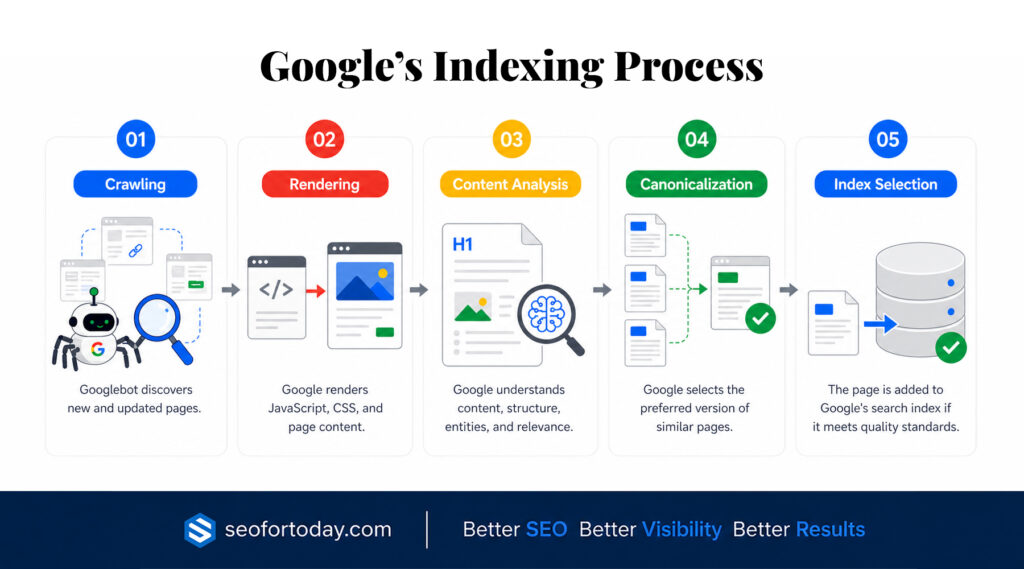
The process generally follows these stages.
1. Crawling
Before a page can be indexed, Google must first discover and crawl it using Googlebot.
During crawling, Google collects information about the webpage, including its content, links, metadata, images, and technical signals.
If Google cannot successfully crawl a page, it usually cannot be indexed.
Learn more about Google Crawling.
2. Rendering
Many modern websites rely on JavaScript to display content.
After crawling, Google may render the page using its web rendering service to process dynamic content that is not immediately available in the HTML.
Proper rendering helps Google understand the complete webpage, including interactive elements and JavaScript-generated content.
3. Content Analysis
Google then analyzes the page to better understand its purpose and value.
This evaluation considers many elements, including:
- Main content
- Page titles
- Headings
- Images
- Internal links
- Structured data
- Metadata
- Overall content quality
Google also evaluates whether the page provides unique value compared to similar pages already in its index.
Learn more about Content Writing Strategy.
4. Canonicalization
If Google discovers multiple versions of similar content, it attempts to determine which version should be treated as the primary page.
Canonicalization helps Google avoid storing duplicate versions of the same content while consolidating ranking signals.
Although website owners can specify canonical URLs, Google ultimately decides which version it considers canonical.
5. Index Selection
After processing the page, Google determines whether it should be included in its search index.
Not every crawled page is indexed.
Google evaluates numerous factors before making this decision, including:
- Content quality
- Originality
- Technical accessibility
- Overall usefulness
- Duplicate content
- Search demand
If the page meets Google’s quality expectations, it may be added to the index and become eligible to appear in search results.
Google Crawling vs. Indexing vs. Ranking
Many people mistakenly assume that crawling, indexing, and ranking are the same process. In reality, they are three separate stages of how Google processes webpages.
Understanding these differences helps diagnose SEO issues more effectively.
| Process | What Happens |
|---|---|
| Crawling | Google discovers and visits webpages to collect information. |
| Indexing | Google analyzes the crawled page and decides whether to store it in its search index. |
| Ranking | Google determines where indexed pages should appear for relevant search queries. |
For example, when you publish a new article:
- Googlebot first discovers and crawls the page.
- Google analyzes the content and decides whether to index it.
- Once indexed, the page becomes eligible to rank for relevant keywords.
- Google continuously evaluates the page against other content to determine its position in search results.
Because these stages are independent, a page can be:
- Crawled but not indexed.
- Indexed but not ranking well.
- Crawled repeatedly without being indexed.
- Indexed but rarely shown because it lacks relevance for competitive search queries.
Understanding where a page is in this process makes it much easier to identify technical issues and prioritize the right SEO improvements.
Learn more about Google Crawling.
What Google Looks for Before Indexing a Page
Not every crawled page is automatically added to Google’s index. Before including a page in its search database, Google evaluates whether the content provides enough value, can be accessed without technical issues, and offers a good experience for users.
While Google doesn’t publish a complete list of indexing factors, several elements consistently influence whether a page is eligible for indexing.
1. Content Quality
Google aims to index content that is useful, informative, and satisfies user intent.
Pages with original insights, comprehensive explanations, and well-organized information are more likely to be indexed than pages with thin or low-value content.
High-quality content typically:
- Answers users’ questions clearly
- Demonstrates expertise
- Covers the topic thoroughly
- Provides accurate and up-to-date information
- Offers unique value compared to similar pages
Creating content for people rather than search engines remains one of the strongest signals for long-term indexing success.
Learn more about Content Writing Strategy.
2. Originality
Google prefers content that contributes something new instead of duplicating information already available online.
If multiple pages contain nearly identical information, Google may choose to index only one version while ignoring the others.
Original research, practical examples, unique perspectives, and first-hand experience can help distinguish your content from competing pages.
3. Technical Accessibility
Even excellent content may fail to be indexed if Google cannot access or process it properly.
Common technical barriers include:
- Incorrect robots.txt rules
- Noindex directives
- Broken internal links
- Server errors
- Redirect loops
- Poor website architecture
A technically healthy website makes it easier for Googlebot to crawl, process, and evaluate your content.
4. Internal Linking
Internal links help Google discover new pages and understand how different pieces of content relate to one another.
Pages that are isolated or difficult to reach often receive less attention from Googlebot and may take longer to be indexed.
A strong internal linking strategy helps Google:
- Discover important pages
- Understand topical relationships
- Identify content hierarchy
- Prioritize valuable resources
Well-structured websites generally experience more efficient crawling and indexing.
Learn more about Internal Linking for SEO.
5. Mobile Experience
Google primarily uses the mobile version of a webpage for indexing through its mobile-first indexing system.
Your website should provide a consistent experience across devices by offering:
- Responsive design
- Readable content
- Properly sized images
- Easy navigation
- Fast loading times
A poor mobile experience may affect how Google evaluates and indexes your content.
Learn more about Mobile SEO.
6. Structured Data
Structured data helps search engines better understand the meaning and context of your content.
Although structured data does not guarantee indexing, it provides additional information about elements such as:
- Articles
- Products
- FAQs
- Organizations
- Reviews
- Events
Using appropriate schema markup can improve Google’s understanding of your webpages and increase eligibility for enhanced search features.
Learn more about Structured Data.
Why Google Doesn’t Index Some Pages
One of the most common questions website owners ask is why certain pages remain absent from Google Search despite being published.
In many cases, Google has already discovered and even crawled the page, but has chosen not to include it in the search index.
Understanding the most common reasons can help you identify and resolve indexing issues more effectively.
1. Noindex Directive
Pages containing a ‘noindex’ directive instruct Google not to include them in its search index.
This directive is useful for pages such as:
- Login pages
- Thank-you pages
- Duplicate content
- Internal search results
However, accidental use of a noindex tag on important pages can prevent valuable content from appearing in Google Search.
2. Duplicate Content
When Google encounters multiple pages with nearly identical content, it usually selects one version for indexing while ignoring the others.
Duplicate content often occurs because of:
- URL parameters
- Printer-friendly pages
- Product variations
- Multiple category paths
- Copied content
Using canonical tags helps indicate the preferred version, although Google ultimately decides which page to index.
3. Crawled – Currently Not Indexed
This status in Google Search Console indicates that Google successfully crawled the page but decided not to index it at this time.
Possible reasons include:
- Limited content value
- Duplicate or highly similar content
- Low overall quality
- Weak internal linking
- Lack of sufficient signals indicating importance.
Improving the page’s usefulness and uniqueness may increase its chances of being indexed during future crawls.
4. Discovered – Currently Not Indexed
This status means Google knows the page exists but has not yet crawled it.
Common causes include:
- Large websites with many URLs
- Crawl budget limitations
- Recently published content
- Limited internal links
- Low crawl priority
Over time, Google may revisit these pages as it allocates crawl resources.
5. Blocked by Robots.txt
If your robots.txt file blocks Googlebot from accessing a page, Google may be unable to crawl and evaluate it properly.
Website owners should review robots.txt carefully to ensure important content is not unintentionally blocked.
6. Soft 404 Pages
A soft 404 occurs when a page appears to exist but provides little or no useful content.
Examples include:
- Empty category pages
- Placeholder pages
- Thin affiliate pages
- Pages displaying “not found” messages while returning a 200 status code
Google may choose not to index these pages because they provide minimal value to users.
7. Low-Quality or Thin Content
Pages containing very little original information often struggle to be indexed.
Examples include:
- Extremely short articles
- Automatically generated pages with little editing
- Near-duplicate pages
- Pages offering minimal user value
Google’s goal is to maintain a high-quality search index, so content that lacks originality or usefulness may be excluded.
Understanding these indexing decisions can help you prioritize improvements that increase the likelihood of your most valuable pages being included in Google Search.
How to Check if a Page Is Indexed
Regularly monitoring your indexing status helps ensure that Google can find and include your important pages in its search index. If a page isn’t indexed, it cannot appear in Google Search, regardless of how well it is optimized.
Fortunately, there are several simple ways to verify whether a page has been indexed.
1. Google Search Console
Google Search Console is the most reliable source for monitoring your website’s indexing status.
The Page Indexing report shows:
- Indexed pages
- Non-indexed pages
- Pages with warnings
- Reasons why pages weren’t indexed
Reviewing this report regularly helps identify technical issues before they impact your search visibility.
2. URL Inspection Tool
The URL Inspection tool allows you to check the indexing status of an individual page.
It provides information such as:
- Whether the page is indexed
- The last crawl date
- Canonical URL selection
- Crawling and indexing issues
- Mobile usability
- Structured data detection
If you’ve recently updated a page, you can also request Google to recrawl it using this tool.
3. Google Search Operator
Another quick way to check indexing is by using Google’s site: search operator.
For example: site:yourdomain.com/page-url
If the page appears in the results, it has likely been indexed. If it doesn’t appear, it may not be indexed, although Google Search Console remains the more accurate source.
How to Improve Google Indexing
While Google ultimately decides whether a page should be indexed, following SEO best practices makes it easier for Google to discover, evaluate, and include your content in its search index.
1. Publish High-Quality Content
Creating helpful, original, and comprehensive content gives Google stronger reasons to index your pages.
Focus on content that:
- Solves users’ problems
- Demonstrates expertise
- Covers the topic thoroughly
- Stays up to date
- Offers unique value
Pages that provide genuine value are more likely to remain indexed over time.
2. Strengthen Internal Linking
Internal links help Google discover new pages while reinforcing the relationship between different topics across your website.
Whenever possible, link naturally from authoritative pages to newer or important content.
A well-planned internal linking strategy improves both crawl efficiency and indexing.
3. Submit an XML Sitemap
An XML sitemap helps Google discover important pages, particularly on larger websites.
Keep your sitemap updated and submit it through Google Search Console whenever significant content is added or removed.
4. Improve Crawlability
Google cannot index pages it cannot access.
Ensure that:
- Important pages aren’t blocked by robots.txt
- Internal links are functioning correctly
- Redirects are properly configured
- Server errors are minimized
- Website performance remains reliable
Improving crawlability directly supports better indexing.
5. Remove Technical Barriers
Technical issues can prevent otherwise valuable pages from being indexed.
Regularly check for:
- Noindex directives
- Broken links
- Redirect chains
- Duplicate URLs
- Incorrect canonical tags
- Server response errors
Resolving these problems helps Google process your website more efficiently.
6. Maintain a Healthy Website
Indexing isn’t a one-time process. Google continuously reviews websites as content changes over time.
Regular website maintenance includes:
- Updating outdated content
- Fixing technical SEO issues
- Improving page speed
- Removing obsolete pages
- Strengthening internal links
- Monitoring Search Console reports
Healthy websites are generally easier for Google to crawl, evaluate, and maintain within its search index.
Learn more: If you’re looking for practical instructions on requesting indexing and resolving indexing issues, read our guide on How to Get Your Website Indexed by Google.
Best Practices for Google Indexing
Following proven SEO practices helps improve the likelihood that your most valuable pages are indexed and remain eligible to appear in search results.
Some of the most effective best practices include:
- Publish original, high-quality content
- Keep your XML sitemap updated
- Build a logical internal linking structure
- Avoid duplicate content whenever possible
- Use canonical tags correctly
- Monitor indexing reports in Google Search Console
- Improve page speed and mobile usability
- Resolve crawl and indexing errors promptly
- Keep important pages easily accessible
- Update content regularly to maintain relevance
Consistently applying these practices helps Google better understand your website and prioritize valuable content for indexing.
Common Google Indexing Issues
Even well-optimized websites can experience indexing problems from time to time. Identifying these issues early allows you to take corrective action before they affect your search visibility and organic traffic.
Here are some of the most common indexing issues website owners encounter.
1. Pages Excluded from the Index
Google may intentionally exclude certain pages from its index if it determines they provide little value or shouldn’t appear in search results.
Examples include:
- Duplicate pages
- Pages with noindex directives
- Canonicalized pages
- Soft 404 pages
- Alternate pages with proper canonical tags
Reviewing the ‘Page Indexing’ report in Google Search Console can help you understand why specific pages have been excluded.
2. Crawled but Not Indexed
Sometimes Google successfully crawls a page but decides not to include it in the index.
This often happens when the page:
- Offers limited value
- Closely resembles existing content
- Lacks sufficient depth
- Has weak internal linking
Improving the quality and uniqueness of the content can increase its chances of being indexed during future crawls.
3. Discovered but Not Indexed
Google may discover a page without crawling it immediately.
This can occur because of:
- Large websites with many URLs
- Limited crawl resources
- Newly published pages
- Weak website architecture
Improving internal linking and maintaining a clean site structure can help Google prioritize important pages.
4. Duplicate Content
Duplicate or substantially similar pages can make it difficult for Google to determine which version should be indexed.
Using canonical tags, consolidating similar pages, and creating original content help reduce duplication and improve indexing efficiency.
5. Technical SEO Issues
Technical problems can prevent Google from properly processing your website.
Common issues include:
- Robots.txt restrictions
- Incorrect canonical tags
- Server errors
- Broken internal links
- Redirect chains
- Slow website performance
Regular technical SEO audits help identify and resolve these issues before they impact indexing.
Common Mistakes to Avoid
Many indexing problems result from simple but avoidable mistakes.
Avoid these common issues:
- Publishing thin or low-quality content
- Accidentally adding noindex tags to important pages
- Blocking essential pages in robots.txt
- Neglecting internal linking
- Ignoring indexing reports in Google Search Console
- Publishing duplicate or near-duplicate pages
- Failing to update outdated content
- Leaving broken links unresolved
- Assuming every crawled page will automatically be indexed
- Expecting immediate indexing after publishing new content
Regularly reviewing your website’s indexing status helps you catch these issues before they affect your organic performance.
Learn more about how long does Google take to crawl, index, and update a website?
Final Thoughts
Google indexing is a vital step in the search process that determines whether your content can appear in Google Search. Before a page can rank for relevant keywords, Google must first crawl, analyze, and decide to include it in its search index.
Understanding how indexing works allows you to identify technical issues, improve content quality, and create a website that is easier for Google to process. While website owners cannot force Google to index every page, following SEO best practices significantly increases the likelihood that valuable content will be discovered and included in Google’s index.
By publishing high-quality content, maintaining a logical site structure, strengthening internal linking, and regularly monitoring Google Search Console, you can build a healthier website with stronger long-term search visibility.
Remember that indexing is only one part of the SEO process. After a page is indexed, Google still evaluates its relevance, authority, and usefulness before determining where it should rank in search results. Consistently improving your content and technical SEO lays the foundation for better indexing, stronger rankings, and sustainable organic traffic over time.
Learn more about How Often Google Indexes AI-Generated Content Compared to Human-Written Content.