
Your website may look professional, but appearances alone don’t guarantee success.
Slow loading pages, broken links, outdated content, poor mobile usability, technical SEO issues, and weak internal linking can quietly reduce your search rankings, frustrate visitors, and cost you valuable leads or sales.
The challenge is that many of these problems aren’t immediately visible. They develop over time as websites grow, plugins are added, content becomes outdated, or search engine best practices evolve.
This is why regular website audits are essential.
A website audit provides a complete assessment of your website’s health, helping you identify technical issues, content gaps, user experience problems, and optimization opportunities before they negatively affect your business.
Whether you manage a personal blog, an e-commerce store, a local business website, or a large corporate site, performing regular audits helps ensure your website remains fast, secure, user-friendly, and competitive in search results.
In this comprehensive guide, you’ll learn what a website audit is, why it matters, when you should perform one, and how to use a complete website audit checklist to improve your SEO, website performance, and overall user experience.
What Is a Website Audit?
A website audit is the process of thoroughly evaluating every important aspect of a website to identify issues that may affect its performance, search visibility, usability, and conversions.
Rather than focusing on a single area, a complete website audit examines your website from multiple perspectives, including:
- Technical SEO
- On-page SEO
- Website performance
- Content quality
- Internal linking
- Mobile usability
- Core Web Vitals
- Security
- Backlink profile
- User experience
- Accessibility
- Analytics and conversion tracking
The purpose of a website audit is simple:
Identify what’s working, uncover what’s holding your website back, and create a clear action plan for improvement.
Think of your website like a vehicle.
Even if it looks brand new on the outside, hidden issues such as worn brakes, low tire pressure, or engine problems can affect its performance.
Similarly, a website may appear perfectly functional while suffering from hidden issues such as crawl errors, duplicate content, broken internal links, slow-loading pages, or indexing problems that reduce its visibility in search engines.
A comprehensive audit helps you discover these problems before they become costly.
Why Regular Website Audits Matter
Search engines constantly evolve.
Google releases algorithm updates throughout the year, user expectations continue to rise, and new technologies influence how websites are evaluated.
A website that performed well last year may now contain issues that limit its growth.
Regular website audits help you stay ahead by ensuring your website continues to meet modern SEO and user experience standards.
Some of the biggest benefits include:
1. Improve Search Engine Rankings
Many ranking problems are caused by technical issues rather than poor content.
Fixing crawl errors, duplicate pages, missing metadata, and indexing problems helps search engines better understand your website.
2. Increase Organic Traffic
An optimized website is easier for search engines to crawl and rank.
Improving technical health, content quality, and page performance creates more opportunities to attract qualified visitors through organic search.
3. Enhance User Experience
Visitors expect websites to load quickly, function properly, and provide a seamless browsing experience.
Improving navigation, mobile usability, accessibility, and page speed helps users find information more efficiently while reducing bounce rates.
4. Increase Conversions
Website audits don’t only improve rankings.
They also identify obstacles that prevent visitors from becoming customers, creating a smoother customer experience that encourages higher conversions.
Optimizing landing pages, calls-to-action, forms, and user journeys often leads to higher conversion rates.
5. Strengthen Website Security
Regular security checks help identify outdated software, broken SSL certificates, malware risks, and other vulnerabilities before they affect your business or visitors.
6. Stay Competitive
Your competitors continuously improve their websites.
Performing regular audits helps you identify new opportunities, adapt to industry changes, and maintain a competitive advantage.
When Should You Perform a Website Audit?
There is no single schedule that fits every website.
However, most businesses benefit from performing audits regularly instead of waiting until problems appear.
Consider conducting a website audit:
- Before launching a new website.
- After redesigning your website.
- Following a major Google algorithm update.
- Before starting a large SEO campaign.
- When organic traffic suddenly declines.
- Before migrating to a new domain or CMS.
- After adding significant new content.
- Every three to six months, as part of routine website maintenance.
Large websites that publish content frequently may benefit from monthly technical audits, while smaller websites can often perform comprehensive audits quarterly.
The key is consistency.
Small issues are much easier to fix before they grow into larger SEO problems.
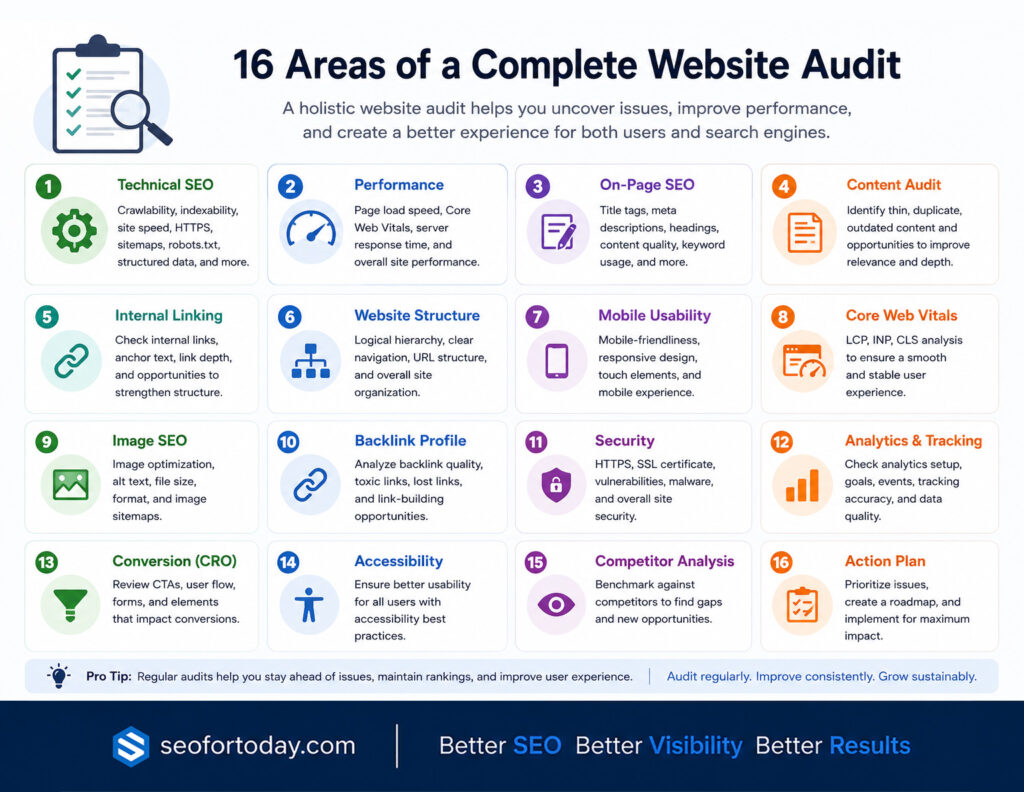
Website Audit Checklist
A successful website audit isn’t about checking one or two SEO factors.
It’s about evaluating every part of your website that influences visibility, performance, and user experience.
The following checklist covers the most important areas every website owner should review on a regular basis.
| Audit Area | Priority | Recommended Frequency |
|---|---|---|
| Website Performance | High | Monthly |
| Technical SEO | High | Monthly |
| On-Page SEO | High | Quarterly |
| Content Quality | High | Quarterly |
| Internal Linking | Medium | Quarterly |
| Website Structure | Medium | Quarterly |
| Mobile Usability | High | Monthly |
| Core Web Vitals | High | Monthly |
| Image Optimization | Medium | Quarterly |
| Backlink Profile | High | Monthly |
| Website Security | High | Monthly |
| Local SEO | Medium | Quarterly |
| Analytics & Tracking | High | Monthly |
| Conversion Optimization | Medium | Quarterly |
| Accessibility | Medium | Quarterly |
| Competitor Analysis | Medium | Quarterly |
Rather than treating these areas as separate SEO tasks, think of them as parts of a complete website health check.
Each contributes to your website’s ability to rank well, provide an excellent user experience, and achieve your business goals.
Website Audit Checklist
A website audit is only valuable if it leads to meaningful improvements.
Instead of trying to fix everything at once, evaluate your website one area at a time. This structured approach helps you identify high-impact issues, prioritize fixes, and continuously improve your website’s performance.
The following checklist covers the most important areas every website owner should review regularly.
1. Website Performance Audit
Website speed directly affects user experience, conversions, and search rankings.
A slow website frustrates visitors, increases bounce rates, and makes it harder for search engines to crawl your pages efficiently.
During your performance audit, check:
- Page loading speed
- Server response time
- Largest Contentful Paint (LCP)
- Interaction to Next Paint (INP)
- Cumulative Layout Shift (CLS)
- Browser caching
- CSS and JavaScript optimization
- Unused code
- CDN implementation
Recommended tools:
- Google PageSpeed Insights
- Lighthouse
- GTmetrix
- WebPageTest
Focus on improving Core Web Vitals while maintaining an excellent user experience.
2. Technical SEO Audit
Technical SEO ensures search engines can crawl, understand, and index your website efficiently.
Even outstanding content can struggle to rank if technical issues prevent search engines from accessing it properly.
Review the following:
- Crawl errors
- Indexing status
- XML sitemap
- Robots.txt file
- Canonical tags
- Redirect chains
- Broken links
- Duplicate content
- HTTPS implementation
- Structured data
- Pagination
- URL structure
Recommended tools:
Address critical technical issues before focusing on content optimization.
Learn more about Technical SEO Audit.
3. On-Page SEO Audit
Every page should be optimized around a clear search intent.
Review whether your pages provide comprehensive, well-structured, and relevant information.
Check:
- Page titles
- Meta descriptions
- H1-H6 heading hierarchy
- Keyword placement
- Internal links
- External links
- URL optimization
- Image alt text
- Schema markup
- Content freshness
Avoid keyword stuffing.
Instead, prioritize clarity, relevance, and usefulness.
Learn more about On-page SEO.
4. Content Audit
Content is one of the most valuable assets on your website.
Regular audits help identify pages that should be updated, consolidated, redirected, or removed.
Evaluate every important page for:
- Accuracy
- Originality
- Search intent
- Topical authority
- Information gain
- Readability
- User engagement
- Content depth
- Outdated information
Questions to ask:
- Does this page still provide value?
- Is it better than competing pages?
- Could it answer the user’s question more completely?
Refreshing existing content is often more effective than constantly publishing new articles.
Learn more about Content Writing Strategy.
5. Internal Linking Audit
Internal links help search engines understand your website while guiding visitors toward related content.
Review:
- Orphan pages
- Broken internal links
- Anchor text diversity
- Link depth
- Navigation structure
- Contextual links
Every important page should receive internal links from relevant pages throughout your website.
A strong internal linking strategy distributes authority and improves crawlability.
Learn more about Internal Linking for SEO.
6. Website Structure Audit
Your website should be organized logically so both users and search engines can easily navigate it.
Review:
- Menu structure
- Categories
- Breadcrumbs
- URL hierarchy
- Click depth
- Navigation consistency
Users should be able to reach important pages within a few clicks.
A simple, organized structure improves usability and crawl efficiency.
7. Mobile Usability Audit
Google primarily evaluates the mobile version of your website.
A poor mobile experience can negatively affect both rankings and conversions.
Check:
- Responsive design
- Font readability
- Button spacing
- Mobile navigation
- Viewport configuration
- Mobile page speed
- Touch usability
Test your website across multiple screen sizes rather than relying on a single device.
Learn more about SEO for Mobile.
8. Core Web Vitals Audit
Core Web Vitals measure how users experience your website.
Monitor:
These metrics indicate whether your pages load quickly, remain visually stable, and respond smoothly to user interactions.
Improving Core Web Vitals often improves both SEO performance and user satisfaction.
9. Image Optimization Audit
Large, unoptimized images are one of the most common causes of slow websites.
Review:
- Image formats
- Compression
- Dimensions
- Lazy loading
- Alt text
- File names
- Responsive images
- Image sitemap
Modern formats such as WebP and AVIF can significantly reduce file sizes while maintaining visual quality.
Learn more about Image SEO.
10. Backlink Audit
Backlinks remain one of Google’s strongest ranking signals.
However, quality matters far more than quantity.
Review:
- Referring domains
- Link quality
- Toxic backlinks
- Lost backlinks
- Anchor text profile
- Link diversity
- New backlinks
Identify opportunities to earn additional high-quality backlinks while monitoring potentially harmful links.
Recommended tools:
Learn more about Off-page SEO.
11. Website Security Audit
Website security protects both users and search engines.
Security issues can reduce user trust and negatively impact search visibility.
Check:
- HTTPS implementation
- SSL certificate validity
- Malware detection
- Software updates
- Plugin updates
- Weak passwords
- Backup procedures
- Security headers
Keeping your website secure reduces the risk of attacks and downtime.
12. Local SEO Audit (If Applicable)
If your business serves a local audience, local SEO should be part of every website audit.
Review:
- Google Business Profile
- NAP consistency
- Local citations
- Customer reviews
- Local landing pages
- Local schema markup
- Google Maps integration
Consistent business information across the web helps improve local search visibility.
Learn more about Local SEO.
13. Analytics & Tracking Audit
Without reliable data, it’s impossible to measure success.
Verify that your tracking systems collect accurate information.
Review:
- Google Analytics 4
- Google Search Console
- Google Tag Manager
- Conversion tracking
- Event tracking
- Goal configuration
- E-commerce tracking
- Cookie consent implementation
Accurate analytics allow you to make informed SEO decisions rather than relying on assumptions.
14. Conversion Rate Optimization Audit
Driving traffic is only part of the equation.
Your website should also convert visitors into leads or customers.
Evaluate:
- Calls-to-action
- Landing pages
- Forms
- Checkout process
- User journey
- Trust signals
- Testimonials
- Page layouts
Small improvements in conversion rates often generate greater business impact than simply increasing traffic.
Learn more about Conversion Rate Optimization.
15. Accessibility Audit
An accessible website benefits everyone.
It also demonstrates quality and usability.
Review:
- Alt text
- Color contrast
- Keyboard navigation
- Heading hierarchy
- ARIA labels
- Form accessibility
- Readable typography
Accessibility improvements often enhance the user experience for all visitors.
Learn more about Accessibility SEO.
16. Competitor Website Audit
Don’t evaluate your website in isolation.
Compare it against competitors to discover opportunities for improvement.
Analyze:
- Content quality
- Keyword coverage
- Backlink profile
- Site speed
- Internal linking
- Content depth
- User experience
- Structured data
- Core Web Vitals
Learning from successful competitors can reveal gaps in your own strategy while helping you identify opportunities to outperform them.
Best Website Audit Tools
A website audit is only as effective as the data behind it. Fortunately, there are excellent tools available to help identify technical issues, analyze performance, monitor backlinks, and uncover SEO opportunities.
No single tool covers every aspect of a website audit, so combining multiple tools often provides the most complete picture.
| Tool | Best For |
|---|---|
| Google Search Console | Indexing, crawl errors, search performance, Core Web Vitals |
| Google Analytics 4 | User behavior, traffic analysis, conversions |
| Google PageSpeed Insights | Website speed and Core Web Vitals |
| Lighthouse | Performance, accessibility, SEO, best practices |
| GTmetrix | Detailed page speed analysis |
| Screaming Frog SEO Spider | Technical SEO and website crawling |
| Ahrefs | Backlink analysis, keyword research, competitor insights |
| Semrush | Complete SEO audits and competitor analysis |
| Sitebulb | Technical website auditing and visualization |
| Bing Webmaster Tools | Indexing and search performance on Bing |
While premium tools offer advanced insights, many website owners can conduct a comprehensive audit using free tools such as Google Search Console, Google Analytics, Lighthouse, and PageSpeed Insights.
Common Website Audit Mistakes
Performing an audit is important, but avoiding common mistakes is equally essential.
Many websites continue to struggle because audits focus on the wrong priorities or overlook critical issues.
1. Only Checking Technical SEO
Technical SEO is important, but it’s only one part of a successful website.
A complete audit should also evaluate:
- Content quality
- User experience
- Internal linking
- Mobile usability
- Website performance
- Conversion optimization
2. Ignoring Search Intent
Some pages rank poorly because they fail to satisfy what users are actually looking for.
Always ask:
- Does this page answer the user’s question?
- Is it more helpful than competing pages?
- Would I bookmark or share this page?
3. Fixing Low-Priority Issues First
Not every issue deserves immediate attention.
Prioritize problems that have the greatest impact on:
Small cosmetic improvements should never delay fixing critical technical issues.
4. Forgetting Mobile Users
Most users now browse websites on mobile devices.
Always review your website across multiple screen sizes, not just on desktop.
5. Treating Website Audits as One-Time Tasks
SEO is an ongoing process.
Your competitors continue improving their websites, Google updates its algorithms regularly, and user expectations constantly evolve.
Regular audits help ensure your website remains healthy over time.
Website Audit Checklist (Quick Reference)
Use this checklist whenever you perform a website audit.
1. Technical SEO
- HTTPS enabled
- XML sitemap submitted
- Robots.txt configured
- Canonical tags implemented
- No crawl errors
- No broken pages
- No redirect chains
- Structured data validated
2. Performance
- Core Web Vitals passing
- Fast page loading
- Images compressed
- JavaScript optimized
- CSS optimized
- Browser caching enabled
- CDN configured (if applicable)
3. On-Page SEO
- Unique title tags
- Optimized meta descriptions
- Proper heading hierarchy
- Internal links added
- External references included
- Optimized URLs
- Alt text added to images
4. Content
- Search intent satisfied
- Accurate information
- Updated content
- Duplicate content removed
- Thin pages improved
- Helpful, original content published
5. Mobile & User Experience
- Responsive design
- Easy navigation
- Readable fonts
- Accessible buttons
- Clear calls-to-action
6. Security
- SSL certificate active
- CMS updated
- Plugins updated
- Regular backups
- Security monitoring enabled
7. Analytics
- Google Analytics 4 is working
- Google Search Console connected
- Conversion tracking configured
- Events properly tracked
- Goals correctly configured
Completing this checklist regularly helps maintain a healthy, secure, and search-friendly website.
Final Thoughts
A successful website isn’t built once and forgotten.
It requires continuous monitoring, optimization, and improvement.
Regular website audits help you identify hidden technical issues, improve search visibility, strengthen user experience, and uncover new growth opportunities before they become serious problems.
Rather than waiting for rankings or traffic to decline, make website audits part of your ongoing SEO strategy.
A healthy website is easier for search engines to crawl, more enjoyable for users to navigate, and better equipped to convert visitors into customers.
Whether you’re managing a personal blog, an online store, or a business website, following a structured website audit checklist will help you maintain strong performance and stay competitive as search engines and user expectations continue to evolve.
Remember, the goal of a website audit isn’t simply to find problems. It’s to build a faster, more secure, more helpful website that delivers lasting value to both users and search engines.
Frequently Asked Questions
1. How often should I perform a website audit?
Most websites should undergo a comprehensive audit every three to six months. Technical audits, Core Web Vitals checks, and security reviews should ideally be performed monthly, especially for websites that publish content regularly.
2. What tools are best for website audits?
Use tools like Google Search Console, Ahrefs, Screaming Frog, SEMrush, and GTmetrix for comprehensive analysis.
3. Which free tools can I use for a website audit?
Several free tools provide valuable insights, including Google Search Console, Google Analytics 4, Google PageSpeed Insights, Lighthouse, and Bing Webmaster Tools.
These tools are excellent starting points for identifying technical and performance issues.
4. What’s the most important part of a website audit?
Technical SEO and content quality are the most crucial. They directly affect how search engines crawl, index, and rank your website.
5. How long does a website audit take?
A basic audit can take a few hours, but a deep SEO and performance audit might take several days, depending on site size.
6. Can I do a website audit myself?
Yes. Many website owners can perform basic and intermediate audits using free SEO tools and structured checklists.
However, larger websites or businesses operating in competitive industries may benefit from professional SEO audits that provide deeper technical analysis and strategic recommendations.